
Email sign-up
Available everywhere. Full control over the password; recovery via your inbox.
Stake, the crypto-first casino and sportsbook launched in 2017, lets players from India open an account in about two minutes with just an email, a username and a password. Alongside our Stake review, this guide walks through the sign-up form, two-factor protection and the KYC levels you will meet before a first withdrawal. Register now, and your very first bets already count towards the $100,000 Daily Races.
Current Stake promotions: Weekly Raffle $75,000 · Daily Races $100,000 · Wheel Wars $150,000 a month
You do not need any documents to open the account itself — Stake asks for identity papers later, during verification. But it saves time to have everything at hand from the beginning, because the details you type into the form must match your documents exactly.
| Age | 18 or older — Stake asks you to confirm this at sign-up |
|---|---|
| Email address | One you control and check regularly; it is used for confirmation and password resets |
| Username | Shown publicly in chat and on leaderboards; usually cannot be changed later |
| Password | Long and unique — not reused from email, banking or social media |
| Date of birth | Not part of the sign-up form, but checked during KYC — it must match your PAN, Aadhaar or passport |
| Phone with an authenticator app | For two-factor authentication (Google Authenticator, Authy or similar) |
| Documents for KYC (later) | Photo ID and proof of address — see the documents section |
Check your local rules first. The Stake licence is an offshore one from the Curaçao Gaming Authority, and Stake is not licensed by any Indian authority. India's Promotion and Regulation of Online Gaming Act, 2025 prohibits online money games, and several states have their own laws. Stake's own terms also restrict access from certain jurisdictions. Read the rules that apply to you before creating an account — this guide is not legal advice.
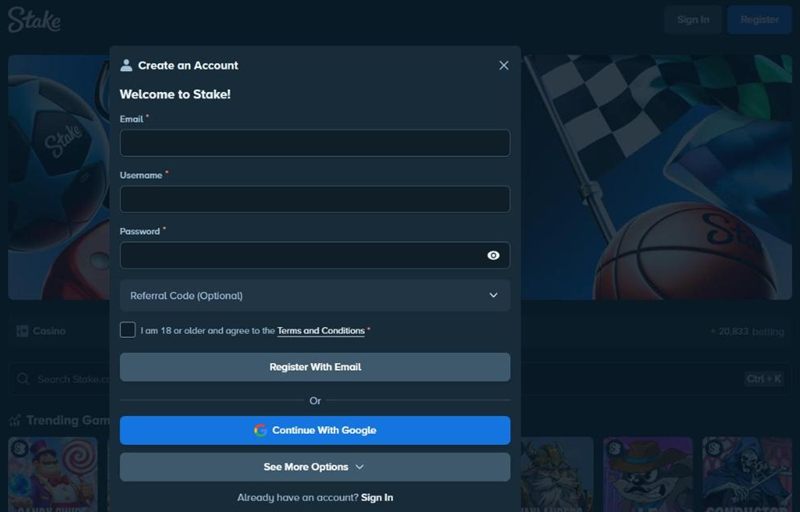
The registration form opens from the “Register” button in the top-right corner of stake.com, on desktop and mobile alike. It fits on one screen: email, username, password, an optional referral code and a checkbox confirming that you are 18 or older and accept the terms.
Once you submit, you land in the lobby already logged in. You can browse the Stake casino and sports markets straight away, but some features — such as withdrawals above certain limits — depend on verification.
Below the email form there is a “Continue With Google” button, and “See More Options” opens the other sign-in methods available in your region. The social account then acts as your login, and Stake still asks you to pick a username.
Social sign-in is convenient, but think about the trade-off:
If you are not sure, the classic email and password route is the simplest to recover if something goes wrong.
Available everywhere. Full control over the password; recovery via your inbox.
Shown in some regions only. Faster, but tied to a third-party account.
Right after registration Stake sends a confirmation message to the address you entered. Open it and click the link — on the same device if possible, so the link opens in the browser where you are already logged in. Until the email is confirmed, some account functions stay limited. If the message does not show up within a few minutes, check the spam and “Promotions” tabs in Gmail, then request a new link from the account settings. Make sure that only stake.com links are opened; any email that asks for your password or 2FA code is not a confirmation email.
Two-factor authentication (2FA) means that a stolen password alone is not enough to get into your account. Stake supports authenticator apps, which generate a new six-digit code every 30 seconds. We recommend switching it on before you make any deposit.
Good to know: once 2FA is active, Stake asks for the code when you log in and before sensitive actions such as withdrawals. Keep the backup key offline — not in a screenshot in your phone's gallery.
Stake uses a tiered “Know Your Customer” process. You fill in the lower levels yourself in the Verification tab of your settings; the higher levels are usually triggered by Stake, for example before a large Stake withdrawal or as part of routine anti-money-laundering checks. Stake can ask for verification at any time.
| Level | What is asked | When |
|---|---|---|
| Level 1 | Basic details: full name, date of birth | Usually soon after sign-up |
| Level 2 | Personal information and residential address | Usually before using the cashier fully |
| Level 3 | Photo of an identity document | Often before larger withdrawals |
| Level 4 | Proof of address and, if required, source of funds | When Stake requests it |
Review times depend on the level and on how clear your uploads are. Stake shows the status of each level in the Verification tab, and support can tell you if something is missing. The exact limits linked to each level are set by Stake and can change, so check your account rather than relying on figures from forums.
Stake's verification page lists the documents it accepts at each level. In practice, players in India most often submit the following — always check what the upload screen asks for on your account.
A common photo ID for identity checks. Make sure the name and date of birth match your Stake profile.
Shows both identity and address. Many people upload a masked Aadhaar that hides the first eight digits of the number.
Widely accepted for identity. Upload the photo page; the address page can help with proof of residence.
Electricity, gas, broadband or a bank statement in your name, usually issued within the last few months.
Upload tips: photograph the whole document on a dark, flat surface, with all four corners visible and no glare. Do not crop, edit or cover anything other than what the document format already allows to be masked. Blurry and cropped images are the main reason for re-submission requests.
Multiple accounts are the most serious of these. Stake's terms prohibit them, and duplicate accounts can be closed with the balance withheld. If you are locked out of an existing account, our Stake login guide explains how to recover it.
Registration is done — but a few minutes of preparation now can save days of back-and-forth later.
With the account secured and verified, the next steps are learning how money moves in and out and finding your way around the products. Our guides to withdrawals and the Stake app are good places to start.
No. The account is created with an email, username and password, plus a checkbox confirming you are 18 or older. Identity documents are requested later during KYC, typically before larger withdrawals.
Aadhaar is one of the documents Indian players commonly submit, both for identity and address. Many people upload a masked Aadhaar. Check the verification screen on your account for the exact list of accepted documents.
No. The code field on the registration form is optional. Leaving it empty does not change anything about how the account works.
Check spam and the Promotions tab, make sure the address was typed correctly, and request a new link from the account settings. If it still does not arrive, contact Stake's live chat.
Usernames are normally fixed. Personal data such as date of birth can only be corrected through support, usually with documents — so enter it correctly the first time.
No. Stake's terms allow one account per person; additional accounts can be closed. If you have lost access, recover the original account through support.